The latest MariaDB release adds a Vector datatype, which is great for storing and querying embeddings. Embeddings are basically a representation of concepts for AI/GPT. I’ve used this when creating a knowledgebase that can have questions asked efficiently against it even at scale.
S3 and S3-compatible storage is an indispensable component of modern web applications, especially when deploying with containers like Docker and Kubernetes.
When developing an application locally, although Laravel and other frameworks have unified storage helpers allowing switching between file systems (usually local and S3), there are many quirks of object storage that will be overlooked if using a local filesystem.
Rather than use a hosted S3 system during development, we can save costs, latency (and time) and bandwidth using a local S3-compatible server. MinIO was the go-to until recently with controversial license changes. RustFS is a good choice for local development. Here is how to set it up with Docker and Laravel for local development:
Specifies which HTTP headers are allowed for signed requests. In practice I’ve found this is required when serving large files.
1
rustfs/rustfs:latest
The Docker image to run (latest version of RustFS).
To configure this as a storage disk in Laravel, we can either create a new disk, or alter the S3 disk. You’ll have to decide which approach to take, which may depend on if you have multiple disks and providers.
The admin interface of RustFS is very easy to use. If you are intending files to be public and using Laravel, it is essential to set your file system as public, and also set your RustFS bucket as public. From experience you will just get silent errors with no error logs to help you.
From experience I’ve found that RustFS requires use_path_style_endpoint, as the URL structure has the bucket name as the first path in the URL, contrary to S3. This is the same in many compatible servers.
During development, the option to ignore self-signed certificate errors is important.
The final step is to set up a reverse proxy on your favorite web server to serve the files. Here’s an example config in Nginx (don’t forget to update your hosts file):
That’s it! Now you have local S3-compatible storage for local development, that won’t cost you in storage and ingress/egress fees, has low latency and won’t use up your bandwidth.
I took photographs from my drone in various grid patterns. These photographs were then processed using OpenDroneMap. The process took a lot of computing power, with some taking 48 hours on a 24-core processor.
Measurements can be taken for heights, widths, distances and volume accurate to around an inch.
Content Shifting, also known as Content Jumping, happens when elements of a web page change height while a page is loading. This can be disorientating to users, and in extreme cases can cause problems if a user clicks on an element as it moves, causing undesired input. It’s also expected in 2021 that search engines will begin penalising content that exhibits content shifting.
To avoid content shifting, the element’s height would be set regardless of the dynamic content it contains.
When using Vue or React JavaScript frameworks, I’ve found that CSS parameters are useful. In my example, a Vue app loads dynamic content and displays it. Unfortunately this causes content shifting.
To avoid this, I pass the number of rows in the HTML/view:
In my CSS/SASS stylesheet, I then use this parameter in a calculation. There are two columns, so the number of rows is divided by 2. It is then multiplied by the height of a single row, and a minimum height is set for the container so that it will not shift:
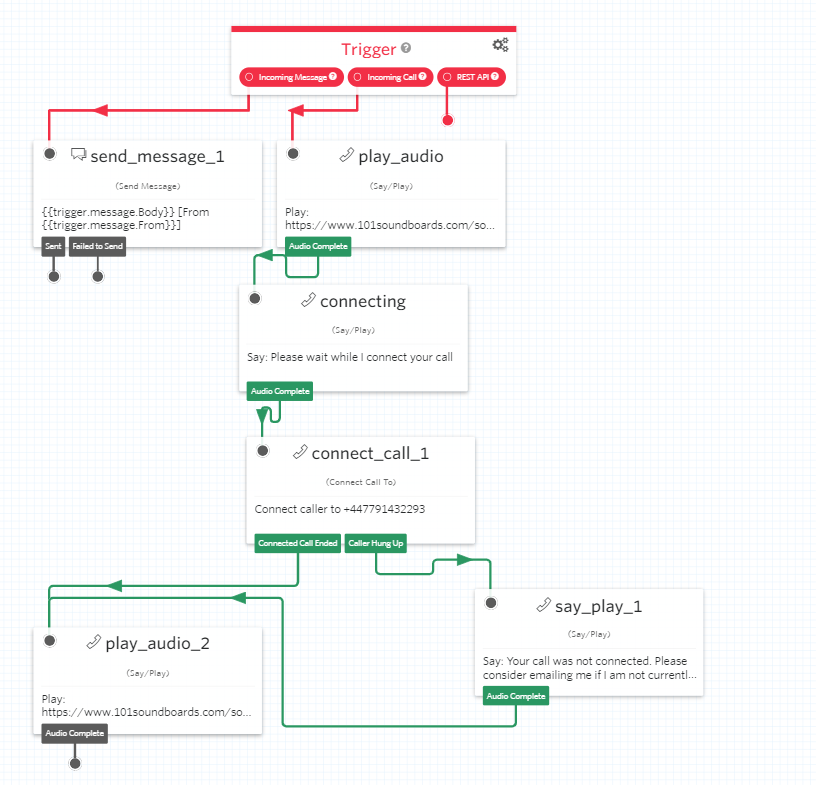
I’ve used Twilio for a while for programmatically sending and receiving SMS messages. There’s also a visual editor called Studio that can be used to make call and message flows:
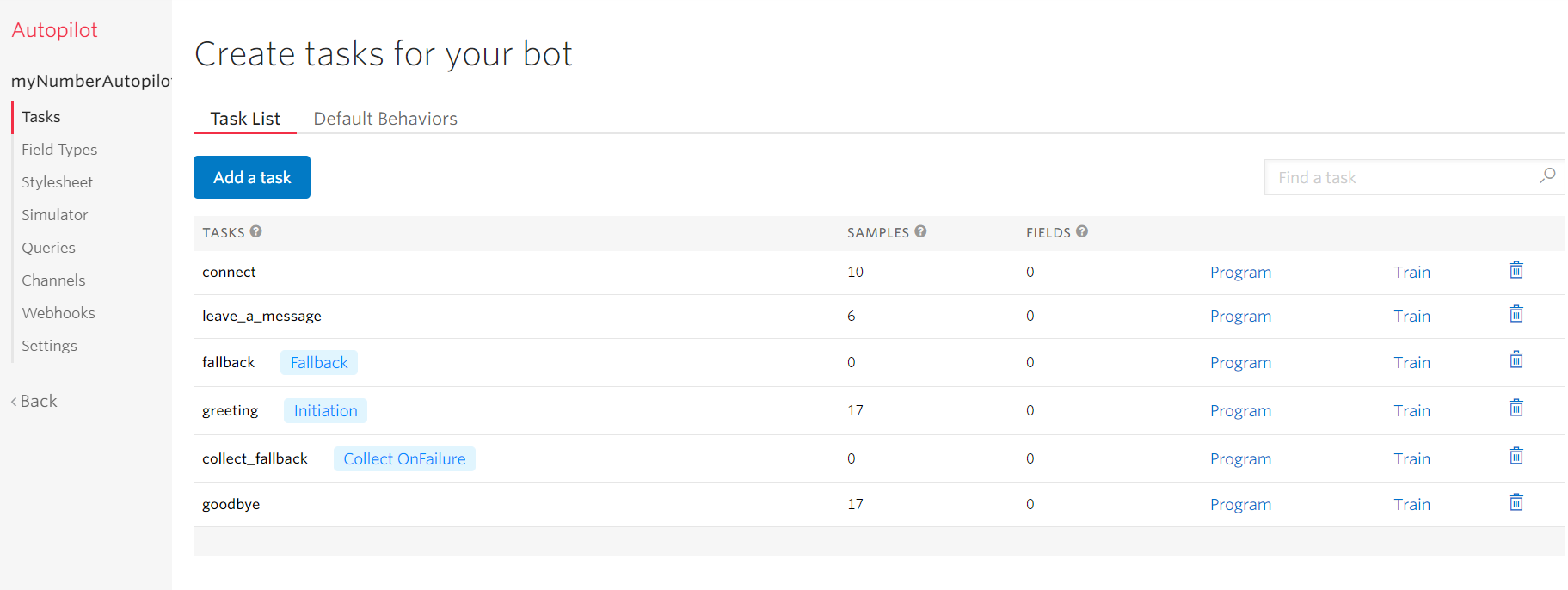
It can be connected to Twilio Autopilot to make AI-powered bots. Tasks are trained with sample phrases. These sample phrases are variations on what would be said to trigger an action e.g. ‘Call reception,’ ‘Front desk,’ ‘Talk to a human.’
An example that comes to mind, is making a call handling system for an office. Rather than a voice menu that details each option followed by a number, the caller could simply say who they wanted to talk to or what their request was about, and the system would handle it. This is far more respectful of the caller’s time compared to having them listen to a long list of choices.
It works with SMS and voice calls, and seems a good way to build an IVR (Interactive Voice Menu) system. TwiML can be used for more complicated tasks, while still using Studio/Autopilot. The pricing is a little higher than if you were to use a self-hosted system, but there are so many complicated functionalities it seems well worth paying the extra, as it would save time and reduce complexity.